


Cvent Events
4.7276.00 Reviews
App Specs
- Version
- 2.3.0 (2.3.0-3481488)
- Updated On
- License
- Free
- Downloads
- 1,000,000+
- Developer
- Cvent
- Categories
- Business
- Platform
- Android, iOS
Screenshots

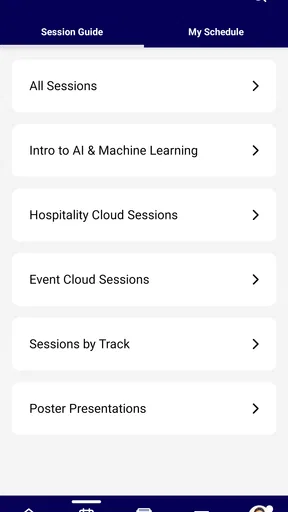
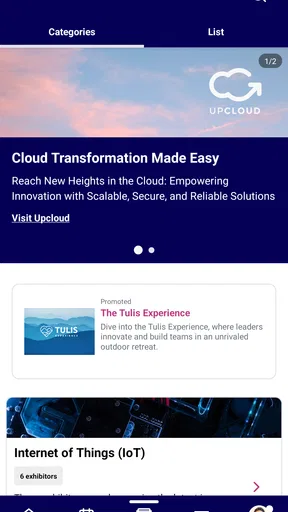
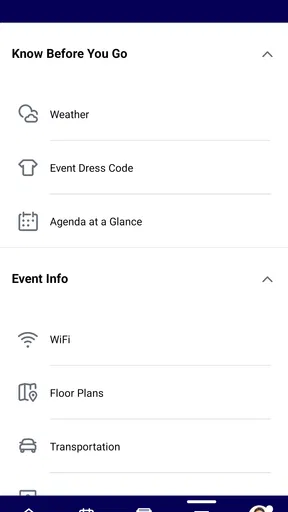
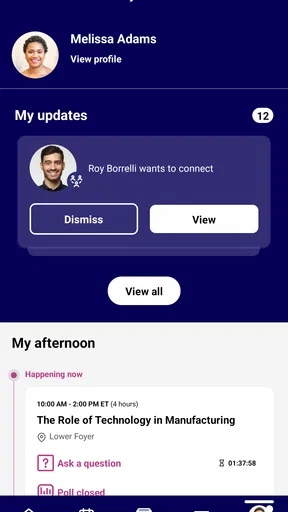
 Analysis by AppCompare
When I’m attending a busy conference, the hardest part is often not finding the venue; it’s keeping track of what is happening, where I need to be, and which details have changed. Cvent Events is built around that attendee-side problem. It is a free business app from Cvent, and I see its main value as giving event information a home on my phone instead of scattering it across emails, notes, and printed schedules. It is most useful when the organizer has prepared the event experience in Cvent; it is not a general-purpose event planner that can replace every tool an organizer uses.
A practical routine for event day
My most useful way to approach an event guide is to check it before leaving, then use it as a reference rather than trying to explore every option on the move. I look for the schedule, locations, and any attendee information the organizer has made available. That small habit helps me avoid relying on an old email when a session or meeting detail has changed. The app’s store description identifies it as a mobile guide powered by Cvent, so its usefulness naturally depends on the event being set up for attendees there.
A realistic example is arriving at a conference with several sessions to choose from and a meeting later in the day. I would review the schedule in advance, note the locations I need, and reopen the guide between sessions to check what comes next. If the organizer shares updates through the app, having one place to consult is more convenient than searching through a long inbox. I would still keep essential travel or personal notes separately: an event guide is handy for event information, not a substitute for every reminder or document I need.
Small habits that make the guide easier to use
One useful habit is to check the app while you still have a quiet moment, not only when you are already in a crowded hallway. That gives you time to find the event’s schedule and understand how its information is arranged. I also recommend checking again after arriving, since the organizer’s current event materials are more useful than a screenshot saved before the trip. This is a simple workflow, not a hidden feature, but it reduces the chance of acting on stale details.
For a multi-session day, I would decide on a rough plan before the first session and leave room to change it. That is a better fit for an event guide than trying to treat the schedule as a rigid personal calendar. If you are attending with colleagues, agree on where you will reconnect rather than assuming everyone will interpret the event information in the same way. The app can centralize the event’s published details, but your group still needs to coordinate its own plans.
What to check before relying on it
Because event content is prepared by the organizer, the first thing I would check is whether the specific event I’m attending is available in the app and whether its schedule and attendee details are populated. A well-prepared guide can be a useful companion; an event with sparse or outdated information will feel much less helpful, regardless of how straightforward the app itself is. This organizer-dependent setup is the main practical limitation to keep in mind.
I would also check how the event presents its information before depending on the app for a tight schedule. If you need a personal calendar reminder, a detailed route, or a record that remains useful after the event, your usual calendar, maps, or notes app may still be the better tool for that specific job. The guide’s strength is event context, not replacing every utility on your phone. I find this division clearer than expecting one app to handle planning, navigation, and personal task management equally well.
Worth Reading Before You Choose

EA SPORTS FC Mobile 26 Is a Bigger Football Game, but It Takes Time

Flipboard Shows What News Apps Must Do Beyond the Feed

Switching to Android Auto Means Rethinking Your Driving Routine

Google Calendar Makes a Crowded Week Easier to Manage

Ludo King Makes the Most of the Minutes Between Plans

Baby Panda World Brings Quick Play to Modern Phones, but Its Game Library Feels Busy
Getting Started with Cvent Events
First things first, downloading Cvent Events is a breeze, available on both Android and iOS. Once installed, you're greeted with a clean and intuitive interface. I love how everything is laid out logically, making it super easy to jump right into planning your event.
Setting Up Your Event
Creating an event is as simple as tapping a few buttons. You’re prompted to enter details like the event name, date, and location. The app offers a host of options to customize your event, from managing registrations to setting up ticketing. I found it particularly useful that you can integrate it with your calendar, ensuring you never double-book yourself.
There is an important distinction here for anyone deciding whether to install it: the app is presented as an event guide for attendees, while the paragraph above describes organizer-style setup tasks. I would not assume that every attendee can create events, manage ticketing, or control registrations simply by installing the mobile app. Those capabilities depend on the event’s setup and the role a person has. If you are attending, start by looking for your event’s materials; if you organize events, check that the workflow you need is actually available to your account before making this your only planning tool.
Managing Attendees
This is where the app truly shines. You can send invites, track RSVPs, and even segment your audience for targeted messaging. I was impressed by the real-time updates on attendee numbers, which are crucial for making those last-minute adjustments. The app also includes a nifty feature for sending push notifications, keeping everyone in the loop about important updates.
For an attendee, the practical benefit of event communications is less about managing a guest list and more about having a place to check the organizer’s updates. I would look there when a room change or timing adjustment matters, rather than assuming an earlier message is still current. Organizers, meanwhile, should treat segmented communication carefully: a useful update reaches the people who need it, while an irrelevant alert can add noise. A repeatable habit of checking the event’s latest information at natural breaks is more comfortable than constantly refreshing a phone.
Engaging Your Audience
Engagement is key to a successful event, and Cvent Events doesn’t skimp on options. From live polls to Q&A sessions, you have a suite of interactive tools at your disposal. I tried out the live polling feature during a mock event, and it was fantastic to see instant feedback from attendees. The app also supports social media integrations, allowing you to create buzz and encourage interaction before, during, and after your event.
Interactive elements are most valuable when they serve the session rather than interrupt it. If a speaker invites questions or a poll, I would keep the app ready and participate at that moment; outside those moments, I would silence distractions and focus on the room. Organizers can make participation easier by explaining when and how to use the event’s interactive options. That simple guidance matters because attendees may be unfamiliar with the app, or may prefer to listen without taking part in every activity.
Post-Event Analysis
Once the event wraps up, the app provides detailed analytics. This feature helps you measure success and gather insights for future events. You can see attendee engagement levels, feedback, and even track ROI. I found this data invaluable, especially when planning subsequent events. It’s like having a crystal ball for your event’s future success.
For organizers, the useful question is not simply whether an event produced numbers, but what decision those numbers can inform next time. If attendance or feedback points to a session that worked especially well, that can shape the next program; if participation was low, the cause might be timing, topic, or how the activity was introduced. I would use analytics as evidence to discuss with the team, not as a complete explanation on their own. Attendees should also keep expectations distinct: post-event analysis is primarily an organizer’s concern, while a participant may care more about retaining notes and follow-up details.
User Experience
The developers have clearly put a lot of thought into the user experience. Navigation is intuitive, and I never felt overwhelmed by features. The app is responsive, with minimal lag, which is crucial when you’re making on-the-fly decisions during an event. Plus, the support section is comprehensive, offering help whenever I had questions or needed guidance.
In choosing between this and familiar alternatives, I would use Cvent Events when an event is organized around its Cvent guide and I want the event’s own information in one place. A calendar is better for personal reminders across unrelated commitments; email is still useful for correspondence and attachments; a notes app is better for private observations. Those tools overlap only partly. The event app is most compelling when it connects me to the program and updates, not when I expect it to become my all-purpose organizer.
The app is a business tool, but the experience is shaped by the event rather than by a universal template I can control. That trade-off is worth accepting for a conference or organized gathering where the host actively maintains its guide. It is less compelling for someone who only needs a basic calendar entry, or for an organizer who wants a standalone personal checklist rather than an event platform. I would decide based on the event’s participation needs, not on the assumption that a feature-rich tool is automatically useful for every occasion.
Who will get the most from it
I would recommend it to attendees who expect to consult an event schedule, receive organizer updates, or take part in session activities through the event experience. It also makes sense for business-event teams that want attendees to engage with the information and interactions they have prepared. Cvent is the developer, and the app has a 4.7 average from around 4.4 thousand ratings, with over one million installs. Those figures suggest that it has reached a substantial audience, though they cannot tell you whether a particular event has been set up thoughtfully.
On the other hand, I would skip it if the event you care about does not use it, if you only need a simple reminder, or if you prefer to keep all plans in a calendar you already use. It is free and rated Teen, but those details do not remove the central dependency: the host needs to provide useful event content. Before building your routine around it, make sure the event itself is present and that the information you need is available.
Limits worth understanding
The biggest limitation is also the natural boundary of an event guide: it is only as useful as the event information and participation options supplied for that occasion. I would not treat every feature described in broad terms as guaranteed to appear at every gathering. An organizer may emphasize schedules and updates, while another may make interactive activities a bigger part of the experience. Attendees should explore what their event actually offers rather than expect every event to behave identically.
There is also a difference between having an option and having a smooth workflow. A poll or Q&A works best when the session host invites participation and explains what to do; without that context, the feature may not add much. Likewise, push updates are helpful when they carry timely, relevant information, but frequent low-value alerts can distract. My practical advice is to use event communications as a source of event-specific changes and keep personal planning in the tools that already work for you.
The current version is 1.139.0, and the app has been available since March 26, 2020. I would keep it updated before attending an event, then open it early enough to get familiar with that event’s layout. That is a sensible preparation step, not a guarantee that every event will offer the same tools or content. The key is to judge the app by how well it serves the particular gathering you are attending.
Final Thoughts
All in all, Cvent Events is a powerhouse app for anyone in the event planning space. It streamlines the entire process, from setup to execution, and even post-event analysis. Whether you’re a seasoned event planner or a newbie, this app equips you with the tools you need to run a successful event. Give it a go, and you’ll wonder how you ever managed without it!
My more measured recommendation is to install it when an event points you to it, then use it as that event’s companion rather than expecting it to replace your calendar, inbox, and notes. For attendees, its value comes from having the program and organizer communications close at hand; for teams, interactive options and follow-up analysis can support a more considered event workflow. If the host keeps the information useful, it can make a busy day easier to navigate. If you need a general-purpose planner or the event does not rely on Cvent, your existing tools may suit you better.
Pros
- User-friendly interface simplifies event management.
- Robust analytics for insightful event reporting.
- Seamless integration with major calendar apps.
- Customizable event pages enhance branding.
- Efficient check-in process with QR code scanning.
Cons
- Steep learning curve for new users.
- Limited offline functionality for remote areas.
- Occasional sync issues with calendar apps.
- Premium features behind a paywall.
- Mobile app could be more responsive.
FAQs for Cvent Events
What is Cvent Events used for?
Cvent Events is a comprehensive platform designed to streamline the planning and management of events. It offers tools for event registration, attendee management, and engagement, making it ideal for conferences, seminars, and corporate gatherings. Users can customize events to fit their specific needs and track event performance seamlessly.
Is Cvent Events suitable for small businesses?
Yes, Cvent Events caters to a variety of business sizes, including small businesses. The platform offers scalable features that can accommodate the needs of smaller teams while still providing robust tools for managing complex events. Users can choose packages that best fit their budget and requirements.
Can Cvent Events be integrated with other software?
Cvent Events supports integration with a range of third-party applications and platforms. This includes CRM systems, marketing automation tools, and payment gateways. These integrations help enhance functionality, allowing users to synchronize data across platforms and improve workflow efficiency.
What kind of support does Cvent Events offer to users?
Cvent Events provides extensive support options, including online resources, tutorials, and a dedicated customer support team. Users can access a knowledge base, participate in community forums, or contact support directly for personalized assistance. The platform ensures users have the help they need to optimize their event management experience.
How secure is the data on Cvent Events?
Data security is a priority for Cvent Events. The platform employs advanced security measures such as encryption and compliance with industry standards like GDPR. Users can trust that their data and their attendees' information are protected against unauthorized access and breaches, ensuring a secure event management process.


